Showing posts with label Software Web Browsers. Show all posts

Thursday, January 12, 2012

Download Maxthon 3.3.4.600 Beta - 24.32MB (Freeware)


Maxthon Internet Browser software is a powerful tabbed browser with a highly customizable interface. It is based on the Internet Explorer browser engine (your most likely current web browser) which means that what works in the IE browser will work the same in Maxthon tabbed browser but with many additional efficient features:

The Ultimate Out-of-box Experience
  • Easy to use and powerful straight out of the box
  • Download now for free, forever!
Maxthon Works the Way You Want It To
  • Swap, add, move, remove, and change Maxthon's tool bars, icons, menus, colors, skins, and layouts until it looks the way you would have designed it.
  • Don't like menus? Use hot keys, word aliases, toolbars, or mouse gestures - it's all up to you.
  • Pick from more than 1,400 plug-ins that make Maxthon the do-all of browsers.
  • Remote conferencing, screen capture, electronic passports, and automatic password inlcuded, free.
Security.
  • Maxthon is 100% free of viruses, spyware, adware รข€“ any kind of malware.
  • The built-in Ad Hunter blocks harmful, or just irritating ads, images and pages.
  • Filter packs screen out offensive and irritating Web pages.

Download Opera 11.60 - 10.14MB (Freeware)


A full-featured Internet browser, Opera includes pop-up blocking, tabbed browsing, integrated searches, and advanced functions like Opera's groundbreaking E-mail program, RSS Newsfeeds and IRC chat. And because we know that our users have different needs, you can customize the look and content of your Opera browser with a few clicks of the mouse.

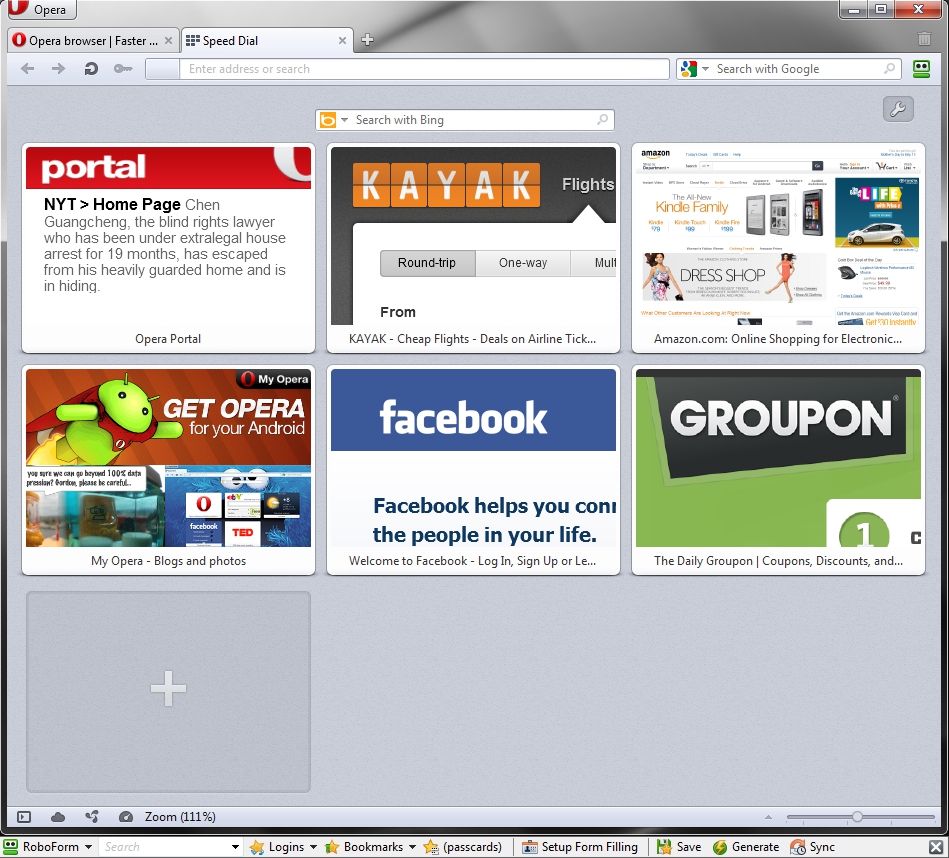
  • Speed Dial: Your favorite sites are just one click away at all times.
  • Search Shortcuts: Faster search - type your queries directly into the address bar.
  • Trash Can: Instantly reopen recently closed tabs.
  • Mouse Gestures: With Opera you can navigate the Web with your mouse.
  • Opera Link: Synchronize data of your choice online, or among different computers and devices.
  • Quick Find: Opera remembers not only the titles and addresses, but also the actual content of the Web pages you visit.
  • Feed Preview: Preview a Feed by clicking on the feed icon, and you will see it in clean and efficient multiple-column layout.
  • Quick and customizable Web search: Get quick access to Google, eBay, Amazon and more with the search field in the upper right corner.

Download Safari 5.1.2 - Apple Inc - 36.52MB (Freeware)


At one time, web browsers simply got you to the Internet. But from the day it was released, Safari set the bar higher for web browsers. It introduced sophisticated design elements that made browsing a joy. Easy to use, Safari stayed out of your way and let you effortlessly navigate from site to site.

More browsing space: Safari is designed to emphasize the browsing, not the browser. The browser frame is a single pixel wide. You see a scroll bar only when needed. By default, there's no status bar. Instead, a progress indicator turns as your page loads. You'll find tabs at the very top of the browser, opening an even wider window for viewing websites. A great browser, Safari lets you simply enjoy the web.

Find the sites you need: Looking for a site you visited in the past but can't quite remember? Use Full History Search to quickly find sites using even the sketchiest search terms. And when you click a web page in Cover Flow, it's because you've already recognized it as the site you were looking for. No more guessing. Innovative features like these show you how good browsing can be.

Satisfy your need for speed: The world's fastest browser, Safari has speed to burn. Why should you wait for pages to load? You want to see those search results, get the latest news, check current stock prices, right now.

Download Google Chrome 18.0.1003.1 Beta - 24.18MB (Open Source)


Google Chrome is a browser that combines a minimal design with sophisticated technology to make the web faster, safer, and easier.

One box for everything
Type in the address bar and get suggestions for both search and web pages.

Thumbnails of your top sites
Access your favorite pages instantly with lightning speed from any new tab.

Incognito mode
Don't want pages you visit to show up in your web history? Choose incognito mode for private browsing.

Download Firefox 10.0 Beta 4 - 15.62MB (Open Source)


The Web is all about innovation, and Firefox sets the pace with dozens of new features to deliver a faster, more secure and customizable Web browsing experience for all.

User Experience. The enhancements to Firefox provide the best possible browsing experience on the Web. The new Firefox smart location bar, affectionately known as the "Awesome Bar," learns as people use it, adapting to user preferences and offering better fitting matches over time.

Performance. Firefox is built on top of the powerful new Gecko platform, resulting in a safer, easier to use and more personal product.

Security. Firefox raises the bar for security. The new malware and phishing protection helps protect from viruses, worms, trojans and spyware to keep people safe on the Web.
Customization. Everyone uses the Web differently, and Firefox lets users customize their browser with more than 5,000 add-ons.

Wednesday, August 24, 2011

Download Opera 11.50 Installer


A full-featured Internet browser, Opera includes pop-up blocking, tabbed browsing, integrated searches, and advanced functions like Opera's groundbreaking E-mail program, RSS Newsfeeds and IRC chat. And because we know that our users have different needs, you can customize the look and content of your Opera browser with a few clicks of the mouse.
  • Speed Dial: Your favorite sites are just one click away at all times.
  • Search Shortcuts: Faster search - type your queries directly into the address bar.
  • Trash Can: Instantly reopen recently closed tabs.
  • Mouse Gestures: With Opera you can navigate the Web with your mouse.
  • Opera Link: Synchronize data of your choice online, or among different computers and devices.
  • Quick Find: Opera remembers not only the titles and addresses, but also the actual content of the Web pages you visit.
  • Feed Preview: Preview a Feed by clicking on the feed icon, and you will see it in clean and efficient multiple-column layout.
  • Quick and customizable Web search: Get quick access to Google, eBay, Amazon and more with the search field in the upper right corner.

Download Internet Explorer 9.0 Vista Installer

Download Internet Explorer 9.0 Vista Installer

Internet Explorer is the world's most popular Web browser. Security, ease of use, and improvements in RSS, CSS, and Ajax support are Microsoft's priorities for Internet Explorer. This version of IE runs on the 32-bit version of Windows Vista.
The latest version of the browser includes support for:
  • Accelerators - which allow supported web applications to be invoked without explicitly navigating to them.
  • WebSlices - which allows portions of page to be subscribed to and monitored from a redesigned Favorites Bar.
  • InPrivate privacy features.
  • SmartScreen phishing filter.

Download Firefox 7.0 Beta 1 Installer


The Web is all about innovation, and Firefox sets the pace with dozens of new features to deliver a faster, more secure and customizable Web browsing experience for all.

User Experience. The enhancements to Firefox provide the best possible browsing experience on the Web. The new Firefox smart location bar, affectionately known as the "Awesome Bar," learns as people use it, adapting to user preferences and offering better fitting matches over time.

Performance. Firefox is built on top of the powerful new Gecko platform, resulting in a safer, easier to use and more personal product.

Security. Firefox raises the bar for security. The new malware and phishing protection helps protect from viruses, worms, trojans and spyware to keep people safe on the Web.

Customization. Everyone uses the Web differently, and Firefox lets users customize their browser with more than 5,000 add-ons.


Download Google Chrome 15.0.854.0 Beta Installer


Google Chrome is a browser that combines a minimal design with sophisticated technology to make the web faster, safer, and easier.

One box for everything
Type in the address bar and get suggestions for both search and web pages.

Thumbnails of your top sites

Access your favorite pages instantly with lightning speed from any new tab.

Incognito mode
Don't want pages you visit to show up in your web history? Choose incognito mode for private browsing.

Safe browsing
Google Chrome warns you if you're about to visit a suspected phishing, malware or otherwise unsafe website.
For information about alpha and developer builds, check out the Chrome dev channel here.


Monday, May 23, 2011

Download Safari 5.0.5+QuickTime for Windows XP, Vista or 7

Apple released Safari 5 on June 7, 2010, featuring the new Safari Reader for reading articles on the web without distraction (based on Arc90's Readability tool[30]), a 30 percent Javascript performance increase over Safari 4, and an additional search engine, Bing. Safari 5 includes improved developer tools and supports more than a dozen new HTML5 technologies, focused on interoperability. With Safari 5, developers can now create secure Safari Extensions to customize and enhance the browsing experience.[31] Apple also re-added the progress bar behind the address bar in this release. Safari 5.0.1 enabled the Extensions PrefPane by default, previously users had to enable it via the Debug menu.

Apple also released Safari 4.1 concurrently with Safari 5, exclusively for Mac OS X Tiger. The update included the majority of the features and security enhancements found in Safari 5. It did not, however, include Safari Reader or Safari Extensions.

Download Internet Explorer 9 for Windows Vista/7 32/64-bit

Windows Internet Explorer 9 has a streamlined look and many new features that speed up your web browsing experience.

Use the new browser controls

The first thing you'll notice when you open Internet Explorer 9 is the simplified design. You can find most command bar functions, like Print or Zoom, when you click the Tools button Picture of the Tools button, and your favorites and feeds appear when you click the Favorites button Picture of the Favorites button.
Tabs automatically appear to the right of the Address bar, but you can move them so they appear below the Address bar, as they did in previous versions of Internet Explorer. You can always show the Favorites, Command, Status, and Menu bars by right-clicking the Tools button Picture of the Tools button, and then selecting them on a menu.
For more information about basic controls, see:

Download Internet Explorer 8 for XP/Vista 32/64-Bit


Internet Explorer 8 is the familiar web browser you are most comfortable using, helping you get everything you want from the web faster, easier, more privately and securely than ever before.
  • Faster Internet Explorer 8 is more responsive with new pages and tabs, opening up fast and reliably. You can now get to the information you care about most, in fewer steps; one click access to your webmail, favorite news sites or other online services.
  • Easier Reduce the steps to accomplish many common tasks, and automate your access to real time information updates. You can keep track of your favorite sports team, news, weather with a single click.
  • More Private Helps protect your privacy and confidential information where ever you go on the web.
  • More Secure Helps protect and stop malicious software from reaching your PC, and makes it easier to detect when a website is an imposter.

Friday, April 29, 2011

Download SeaMonkey 2.0.14 Web Browser

Download Mozilla Firefox 4.0.1

The Web is all about innovation, and Firefox sets the pace with dozens of new features to deliver a faster, more secure and customizable Web browsing experience for all.
User Experience. The enhancements to Firefox provide the best possible browsing experience on the Web. The new Firefox smart location bar, affectionately known as the "Awesome Bar," learns as people use it, adapting to user preferences and offering better fitting matches over time.
Performance. Firefox is built on top of the powerful new Gecko platform, resulting in a safer, easier to use and more personal product.
Security. Firefox raises the bar for security. The new malware and phishing protection helps protect from viruses, worms, trojans and spyware to keep people safe on the Web.
Customization. Everyone uses the Web differently, and Firefox lets users customize their browser with more than 5,000 add-ons.


Wednesday, April 27, 2011

Download Google Chrome 12.0.742.9

Google Chrome is a browser that combines a minimal design with sophisticated technology to make the web faster, safer, and easier.
One box for everything
Type in the address bar and get suggestions for both search and web pages.
Thumbnails of your top sites
Access your favorite pages instantly with lightning speed from any new tab.
Incognito mode
Don't want pages you visit to show up in your web history? Choose incognito mode for private browsing.
Safe browsing
Google Chrome warns you if you're about to visit a suspected phishing, malware or otherwise unsafe website.
For information about alpha and developer builds, check out the Chrome dev channel here.


Thursday, April 14, 2011

Internet Explorer 10: Microsoft ramps up its release schedule


Internet Explorer 10 is a go. Earlier this week, the team at Microsoft made available for download a limited preview of IE10, which is expected to launch about a year from now. (A caveat: The preview will only work on Windows machines. Sorry, Mac people.)

"We built IE9 from the ground up for HTML5 and for Windows to deliver the most native HTML5 experience and the best Web experience on Windows," Microsoft reps wrote over on the IE blog. "IE10 continues on IE9’s path, directly using what Windows provides and avoiding abstractions, layers, and libraries that slow down your site and your experience."


Wednesday, April 13, 2011

[Update] Download Opera 11.10 Installer (9.40MB)


A full-featured Internet browser, Opera includes pop-up blocking, tabbed browsing, integrated searches, and advanced functions like Opera's groundbreaking E-mail program, RSS Newsfeeds and IRC chat. And because we know that our users have different needs, you can customize the look and content of your Opera browser with a few clicks of the mouse.

* Speed Dial: Your favorite sites are just one click away at all times.
* Search Shortcuts: Faster search - type your queries directly into the address bar.
* Trash Can: Instantly reopen recently closed tabs.
* Mouse Gestures: With Opera you can navigate the Web with your mouse.
* Opera Link: Synchronize data of your choice online, or among different computers and devices.
* Quick Find: Opera remembers not only the titles and addresses, but also the actual content of the Web pages you visit.
* Feed Preview: Preview a Feed by clicking on the feed icon, and you will see it in clean and efficient multiple-column layout.
* Quick and customizable Web search: Get quick access to Google, eBay, Amazon and more with the search field in the upper right corner.


[Update] Download Google Chrome 12.0.733.0 Beta (21MB)


Google Chrome is a browser that combines a minimal design with sophisticated technology to make the web faster, safer, and easier.

One box for everything

Type in the address bar and get suggestions for both search and web pages.

Thumbnails of your top sites

Access your favorite pages instantly with lightning speed from any new tab.

Incognito mode

Don't want pages you visit to show up in your web history? Choose incognito mode for private browsing.

Safe browsing

Google Chrome warns you if you're about to visit a suspected phishing, malware or otherwise unsafe website.

For information about alpha and developer builds, check out the Chrome dev channel here.


Saturday, April 9, 2011

Google Announces New Anti-Malware Warning for Chrome Browser

Google, Inc. has recently announced an update for the Chrome browser that is intended to enhance the security of internet users. The new feature, which will be included in the next stable release of the browser, will issue a warning to users when malicious content or unsafe downloads are detected. This new feature will leverage the existing Safe Browsing API, which includes a constantly updated list of phishing and malware sites.
 
This kind of functionality is becoming increasingly important, as the level of malware attacks worldwide has risen as much as 93% since 2009, according to the latest Symantec Internet Security Threat Report. In the last month, a highly visible web attack known as “Lizamoon” infected millions of websites within a very short period of time. That particular attack was somewhat ineffective due to a quick response by the major antivirus companies, but it clearly illustrated the high level of vulnerability of many web properties.
Due to the relative ease with which a malware attack can be executed, internet users are often left vulnerable to emerging threats, many of which rely upon stealth to deliver their payloads to unsuspecting users. The new browser warning being developed for Chrome will attempt to remove the element of surprise for such attacks, giving users at least some means of preventing their computers from being victimized. For the vast majority of the internet populace, the feature can’t come nearly soon enough, as there’s little doubt that the internet threat level will continue to escalate for the remainder of the year and beyond.

Friday, April 1, 2011

Download Internet Explorer 8.0 - XP (Offline Installer)


Internet Explorer is the world's most popular Web browser. Security, ease of use, and improvements in RSS, CSS, and Ajax support are Microsoft's priorities for Internet Explorer. This version of IE runs on Windows XP.

The latest version of the browser includes support for:

  • Accelerators - which allow supported web applications to be invoked without explicitly navigating to them.
  • WebSlices - which allows portions of page to be subscribed to and monitored from a redesigned Favorites Bar.
  • InPrivate privacy features.
  • SmartScreen phishing filter.

Title:Internet Explorer 8.0 XP
Filename:IE8-WindowsXP-x86-ENU.exe
File size:16.10MB (16,883,056 bytes)
Requirements:Windows XP
Languages:en-US
License:Freeware
Date added:March 20, 2009
Author:Microsoft Corporation
www.microsoft.com

Download Link :
Internet Explorer 8.0 - XP (Offline Installer)
Add To Technorati StumbleUpon Digg Delicious Yahoo Google Newsgator MyAol NetVibes BlogLines Add to The Free Dictionary Bitty Excite MIX Netomat Add to fwicki Add to Webwag Add to Webwag