Showing posts with label My Document. Show all posts

Wednesday, April 6, 2011

Top 15+ Popular Reasons Why Your Adsense Account Gets Disabled

There are thounsand reasons that your adsense account has been disabled or terminated. Some are clear and you know why, however, there are many other reasons that you might have never heard about.
I have been with Google Adsense for nearly 7 years and read a lot of topics, articles regarding adsense issues. However, there are still some reasons that I have just known after reading different blogs/forum threads related to adsense account issues.
make money online Top 15+ Popular Reasons Why Your Adsense Account Gets Disabled
If you are a fan of Google Adsense Help Forum, you have been aware of this hot topic. I find this topic very useful and decided to harmonize it here with my own additions. I will try to make it as much simple and understandable as possible. You will know how/why/what exactly Google does not allow.
  1. No Policy Privacy
  2. Copied Contents & Images
  3. Profanity – Porn – Guns – Illegal Stuff
  4. Clicking your own ads
  5. Encouraging a friend to click your ads
  6. Asking readers to click your ads on a forum/blog by placing a banner “Click here” or “Support us by clicking my ads”….
  7. Writing about a subject of which you have no idea what you are talking about.
  8. No ‘Quality’ contents.
  9. Spamming your web address/URLs on forums/blogs/youtube.
  10. Starting 50 twitter sites and placing your Adsense site links
  11. Making Youtube Videos asking people to click your ads
  12. Exchanging clicks with friends or a group of adsense publishers.
  13. Posting your non TOS Adsense webs site on the Adsense forum
  14. Asking stupid questions in the Adsense forum and drawing attention to your site
  15. Using Adwords, Yahoo, Bing etc.. to drive traffic to your site
  16. Placing adsense on your site with Free Games/images you do not own.
  17. Using Adsense on a site that is not finished/under construction/no contents at all.
There are many other reasons that your adsense account can be disabled. You should know all of them or at least the most popular reasons in order to protect your account from termination.

 Source:

http://ahfree.net/make-money-online/top-15-popular-reasons-why-your-adsense-account-gets-disabled.html

Tuesday, April 5, 2011

Goole Open DNS Vs OpenDNS,LLC Via Indonesia (Telkom Speedy)

It can be seen, the ability of OpenDNS, LLC entered ranked No. 1 for supporting the ability of the Internet connection to parts of Indonesia, Benchmark test using the internet connection from Telkom Indonesia (Speedy)

Browser Speed Tests: IE 9 Beta, Firefox 4 Beta, Chrome’s Crankshaft, and Opera 11 Beta

Browser Speed Tests: IE 9 Beta, Firefox 4 Beta, Chrome's Crankshaft, and Opera 11 Beta


Google's got a new "Crankshaft" in its bleeding-edge Chrome, Internet Explorer 9 is out to prove its modern mettle, Firefox 4 is nearly complete, and Opera's adding extensions. It's a good time to put these browsers head to head.
We've done a few of these tests before, and we've got our testing method well in hand. Two variations this go-round, though. One is that Opera 11 beta, too, has extensions. We tried to install roughly equal extensions, in function, on each browser, but Opera's market is just a bit too young to included everything we needed. We'll note what was missing within the results. We also installed Chrome's "Canary" build, the test build with the most up-to-date features and fixes, even newer than in the risky Dev channel, to check out the Crankshaft JavaScript engine we'd heard so much about.
Now—on with the tests. Click on any of the images below for a larger view.

Boot-Up and Warm Loading—Winner: Tie—Chrome 10 (Canary) and Opera 10!


IE9 vs Chrome 10 vs Firefox 4 vs Opera 11.01 vs Safari 5 - The BIG browser benchmark

Now that Mozilla has finally released Firefox 4 to the masses, it’s time for a BIG browser benchmark where we take the leading browsers and pit them against four of the toughest benchmark tests available to see which is the tortoise, and which is the hare.
Note: This post has been updated for the final release of Firefox 4.
Here are the browsers that will be run:
  • Internet Explorer 9 (9.0.8112.16421) 32-bit
  • Internet Explorer 9 (9.0.8112.16421) 64-bit
  • Firefox 4
  • Chrome 10.0.648.151
  • Safari 5.0.4
  • Opera 11.01
Here are the tests that the browsers will face:


Google Launches Plus One


Google Rolls Out Plus One
Google is rolling out a new service that will allow its members to share their opinions of web pages with friends. The service, called Plus One, will allow users to give their recommendations to contacts in their Gmail account, Google reader, and Buzz initially, and there are plans to further expand this to Twitter contacts. Google is also planning on extending the service to news sites to allow them to include the Plus One  function with stories. There is no announcement of plans to incorporate Facebook contacts at this time.


Monday, April 4, 2011

Di Jual : KIA Carens 2002 A/T

SOLD OUT / Terjual


Tanpa perantara :
Plat B, KIA Carens Matic thn.2002 , Coklat Metalik, Body Full Kaleng, Pajak Idup nama sendiri, Full terawat (Perawatan langsung ke bengkel resmi KIA)
Lokasi : DKI Jakarta - Jakarta Pusat
Price : 66 jeti (Nego)
Untuk yang serius only ....


Thursday, March 31, 2011

7 kind of SCAM or Internet Fraud

For online businesses are not necessarily familiar with the word scam or fraud via the internet. The core of this fraud is attacked one of the psychological side of man, the "want something" better is more, cheaper, easier, better, more intense, and much more so that the scammers are always something to lure more .

There are several kinds of scam on the Internet that you have to learn so that you will not be a victim. The aim of the SCAM even this varied, ranging from money matters to the most cruel is the goal of "Slander".

This time I will discuss the 7 kinds of scam or fraud is most often done on the internet, and you may also have become or almost become their victims. The victim was not a fool, but normal people who want more.

1. Phishing

Phishing is the act of stealing the data yourself / your biographical data, ranging from full name, date of birth, the biological mother's name, your address to your ID card number. The purpose of phishing is to access your bank accounts, or to convey messages that are defamatory using the victim's identity.

Phishing usually always side by side with SPAM, the spammer launched an assault on the meaning of thousands to millions of potential victims via e-mail or phone claiming to be employees of insurance, bank officers, and those who think the victim is entitled to request all the data yourself.

Some examples of these include Phishing Phishing up ID, Account paypai, Liberty Reserve, Ebay.

How to avoid so you do not become victims of Phishing as follows:

- Beware of strange emails, when emails are calling you to visit a link that contains a login form, not thinking, immediately close.

- Do not use the general password, in the sense of all your online accounts using a password or a password that is easy to use words (your name, your birth date, your child's name)

- If you want to log into any site like paypai, Ebay, Facebook, you should immediately visit their website by typing the URL address on a web browser and not through third parties, such as E-Mail, via chat, etc..

2. EBAY SCAM

SCAM Ebay is trying to sell goods at prices far below market so that people are interested to buy without having to think long. Usually the goods sold has a price above $ 1000 as TV Plasma, LCD, Spare Parts Motors and Mobil and others.

After the victim to do the transaction and the payment process has been completed, usually delivered goods are counterfeit goods or goods damaged or even worse, do not send anything.

How to avoid EBAY SCAM:

- Try to compare the price of goods you want to buy with a variety of reliable sources, if the price difference is too obvious direct should be avoided

- Check the legality of the documents and see testimonials

- Try to always call them, if it does not have direct phone contact just ignore

But remember, there are few things more dangerous, which is a spammer who managed to get an account that is trusted EBAY (Powerseller). If you want to transact in large numbers should be met immediately or go to his place of business.

3. Nigerian Letter

Most of these types of scams originating from Nigeria, so-called Nigerian Letter. You may never get an e-mail contains a very surprising call to assist in money laundering, where you will be involved and given a commission with a truly exceptional value, or a lawyer who holds the property clientnya have killed his family so that his estate be confused fall into your hands.

The similarity of this type of fraud is your obligation to pay advance tax amounting to several percent of the value you will get, when you pay taxes, they will disappear with your money.

Some things you should avoid:

- Where to get E-Mail that it talked about things like the above, should immediately be deleted without any follow-up.

- Where to find the existence of words such as Bank of Africa, African Development Bank, or anything related to the Bank arising from any country in Africa just be deleted. Because I'm sure you do not have any transactions or deals with Africa.

- If you were told to transfer some money for any reason although it can be proven with picture and complete data, do not be fooled, this is just a hoax.

4. Online Lottery

Online Lottery and Nigerian Letter has a similar scheme with the same trick but with a different chase. Online Lottery For you created tempted not by inheritance, but by winning money from the Lottery that you never follow at all.

5. Ponzi Scheme

Ponzi is the name of the person applying this scheme. It is structured fraud scheme but would be caught. One of the largest Ponzi perpetrator open unmasked this century is Bernard Madoff who has managed to deceive for $ 40 billion or 400 trillion rupiah.

From Ponzi scheme is, offer an investment program with interest / Return on Investment is seductive, and you will get results from the next victim. When you are not a new member / new victims, then this type of fraud will be revealed.

To avoid this very difficult, because a company has a legal document was still doing this scam.

6. HYIP

HYIP or High Yield Investment Program, is one type of program that uses a Ponzi scheme. 90% of HYIP is a lie and 10% were waiting queue for branded a liar, why? Bos HYIP typically uses a large capital to get substantial funds as well. They are willing to pay their members for several years to enhance the credibility and confidence in prospective investors, so investors are not careful will directly invest on a large scale.

Wednesday, March 23, 2011

About ASRock Features

XFast USB

ASRock XFast USB Technology redefines the new standard in high performance computing. It delivers the world's fastest USB data transfer speed.

for more information, please click here.


SmartView

It is the smart start page for IE that combines your most visited web sites, your history, your Facebook friends and your real-time newsfeed into an enhanced view for a more personal Internet experience. ASRock motherboards are exclusively equipped with the SmartView utility that helps you keep in touch with friends on-the-go.

for more information, please click here.

AIWI

Wanna play PC games like Wii? ASRock AIWI software makes your dreams come true! Using ASRock AIWI to connect your apple devices to the ASRock HTPC via WLAN, then you can interact with the PC games with delicate touches and body motion while getting responsive shakes and vibrations that correspond from the game stores.

for more information, please click here.

App Charger

Simply installing the App Charger driver, it makes your iPhone charge up to 40% faster than before. ASRock App Charger supports continuous charging when your PC enters into Standby mode (S1), Suspend to RAM (S3), hibernation mode (S4) or power off (S5). The App Charger technology has been fully applied on ASRock Full series motherboards.

for more information, please click here.

USB 3.0

The SuperSpeed USB3.0 technology supports data transfer rates up to10X faster than USB 2.0 with the optimized power efficiency.

for more information, please click here.

ASRock UCC

UCC (Unlock CPU Core) feature simplifies AMD CPU activation. As long as a simple switch of the BIOS option “Unlock CPU Core”, you can unlock the extra CPU core to enjoy an instant performance boost.

for more information, please click here.

True 333

ASRock True 333 motherboard series offer the unmatched performance with the onboard acceleration of the latest USB3.0 with advanced 10X faster speed; SATA3 technology supports up to 6Gbps data transfer speed, and the most convenient connectivity of eSATA3 devices. To enjoy a completely true computing, ASRock True 333 series motherboards can run the PCI-E for VGA card, SATA3 and USB 3.0 at full speed together simultaneously.

for more information, please click here.

Turbo 50

Simply click the Turbo 50 button in BIOS, the system performance will boost up to 50% increase by automatically overclocking CPU, Memory, GPU frequency and all related voltage settings!

for more information, please click here.

Software Suite

ASRock Software suite, offers a string of user-friendly software, ensures you will have the rich operating experience. Sound Blaster X-Fi technology breathes life into songs, makes your music and movies way better. Cyberlink media tool provides a zero barriers way to play, burn, backup, and edit your multimedia contents.

for more information, please click here.

OC DNA

An exclusive utility developed by ASRock’s outstanding RD team! With OC DNA, you can save your OC settings as a profile and send the profile to your friends! Your friends then can load the OC profile to their own system to get the same OC settings as yours!

for more information, please click here.

C.C.O. (Combo Cooler Option)

C.C.O., stands for Combo Cooler Option, is another exclusive hardware design on ASRock advanced motherboards. C.C.O. provides the flexible options to adopt different CPU cooler types and matches your socket LGA 775 or LGA 1156 / LGA 1366 CPU cooler in the respective holes. Once again, ASRock has successfully expanded the utilization of PCB by the exclusive C.C.O. design.

for more information, please click here.

ErP / EuP 2.0

ErP / EuP, stands for Energy Using Product, was a provision regulated by European Union to define the power consumption for the completed system. ErP / EuP and ErP / EuP 2.0 refer to the total AC power of the completed system shall be under 1.00W and 0.5W in off mode respectively.

for more information, please click here.

Premium Blu-ray Audio

An outstanding technology developed on ASRock motherboard! It provides the excellent audio output of 24-bit/192 kHz with its respective Blu-ray DRM compatible driver/software.

for more information, please click here.

Instant Boot

Allows you to turn on your PC and boot up to Windows in 4 seconds! ASRock Instant Boot not only excels in the Boot Up speed (3~4 sec.), but also provides clean OS and saves the most power energy.

for more information, please click here.

Instant Flash

ASRock Instant Flash is an exclusive and the most user-friendly BIOS flash utility developed by ASRock. It is embedded in Flash ROM which is used to update the system BIOS without having to enter operating systems like MS-DOS or Windows.

for more information, please click here.

IES

ASRock Intelligent Energy Saver is a function to improve energy efficiency by disabling extra phases when CPU is at light loading.

for more information, please click here.

OC Tuner

ASRock OC Tuner is a user-friendly ASRock overclocking tool which allows you to guard your system by hardware monitor function and overclock your hardware devices to get the best system performance.

for more information, please click here.

EZ OC

By loading the CPU / Memory EZ OC setting in BIOS OC Tweaker menu, it will automatically fine tune to the optimized BIOS settings for the selected CPU / Memory frequency.

Good Night LED

Are you eager to enjoy an absolutely better stand-by environment than ever before? ASRock Good Night LED technology can offer you a better environment by extinguishing the unessential LED. By enabling Good Night LED in BIOS, the Power / HDD / LAN LED will be switched off when system is on. Not only this, Good night LED will automatically switch off Power and Keyboard LED when the system enters into Standby / Hibernation mode as well.


Tuesday, March 1, 2011

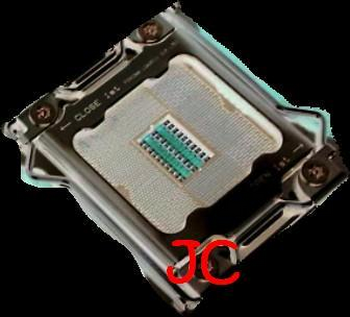
About LGA 2011 Socket Processors


Image : xtreview.com
Socket R
Type LGA
Chip form factors Flip-chip land grid array
Contacts 2011
FSB protocol Intel QuickPath Interconnect
FSB frequency 1× to 2× QuickPath

LGA 2011

From Wikipedia, the free encyclopedia

LGA 2011, also known as Socket R, is an unreleased Intel CPU socket. This socket is set to supersede Intel's LGA 1366 (Socket B) in the high-end and performance desktop market areas[1]. This socket will have 2011 protruding pins which touch contact points on the underside of the processor.

Socket 2011 uses QPI to connect the CPU to either additional CPUs in a dual socket system, or to add-in chipsets. The CPU will handle northbridge functions, such as memory control, PCIe control, DMI, FDI, and other functions integrated on chip.

This socket is expected to be released alongside Sandy Bridge-EX in Q3 2011, and will support 4 memory channels as well as 40× PCIe 3.0 lanes;[2] the socket will measure 58.5mm x 51mm, and is backwards compatible with LGA 1366 cooling solutions.[3]


References


About LGA 1356 Socket Processors

LGA 1356

From Wikipedia, the free encyclopedia

LGA 1356, also known as Socket B2, is an unreleased Intel microprocessor compatible socket which supports future Intel Sandy Bridge microprocessor. LGA is short for Land Grid Array.

LGA 1356 is designed as a replacement for the LGA 1366 (known as Socket B). LGA 1356 has 1356 protruding pins to make contact with the pads on the processor. Processors of LGA 1356 and LGA 1366 sockets are not compatible with each other since they have different socket notches.

The main difference between LGA 2011 and LGA 1356 is 2 QPI connections on the LGA 2011 and 1 QPI connection on the LGA 1356. Other noticeable difference include 2 more Gen 3 PCI-e connections on the LGA 2011 and supports one more channel of DDR3, each of its DDR3 channel can support one more DIMM (only applicable to DDR3 and not DDR3-L) [1]


About LGA 1366 Socket Processors

Socket B
LGA Socket 1366.jpg
Type LGA
Chip form factors Flip-chip land grid array
Contacts 1366
FSB protocol Intel QuickPath Interconnect
FSB frequency 1× to 2× QuickPath
Processor dimensions 1.77 × 1.67 inches[1]
Processors Intel Core i7 (9xx series)
Intel Xeon (35xx, 36xx,
55xx, 56xx series)
Intel Celeron P1053

LGA 1366

From Wikipedia, the free encyclopedia

LGA 1366, also known as Socket B[2][3], is an Intel CPU socket. This socket supersedes Intel's LGA 775 (Socket T) in the high-end and performance desktop segments. It also replaces the server-oriented LGA 771 (Socket J) in the entry level. LGA stands for land grid array. This socket has 1,366 protruding pins which touch contact points on the underside of the processor (CPU)[4] and accesses up to three channels of DDR3 memory via the processor's internal memory controller.

Socket 1366 (Socket B) uses QPI to connect the CPU to a reduced-function northbridge that serves mainly as a PCI-Express controller. A slower DMI is used to connect Intel's most recent northbridge and southbridge components. By comparison, Intel's socket 1156 (Socket H) moves the QPI link and PCI-Express controller onto the processor itself, using DMI to interface a single-component "chipset" (now called PCH) that serves traditional southbridge functions. The difference in pin number is mostly a reflection of the number of memory channels served.

In November 2008, Intel released Core i7, which was the first processor requiring this socket.

Socket B mechanical load limits


Socket B processors have the following mechanical maximum load limits which should not be exceeded during heatsink assembly, shipping conditions, or standard use. Load above those limits will crack the processor die and make it unusable.

Location Dynamic Static
IHS Surface 890 N (200 lbf) 266 N (60 lbf)

Processors using this socket have a lower static load limit than previous models using LGA 775.

Supported chipsets

The desktop chipset that supports LGA 1366 is Intel's X58.

About LGA 1156 Socket Processors

LGA 1156
Asus P7P55-M LGA 1156.jpg
Type LGA
Chip form factors Flip-chip land grid array
Contacts 1156
FSB protocol PCIe 16x (video) + 4x (DMI) + 2 DP (FDI), 2 DDR3 channels
Processor dimensions 37.5 × 37.5 mm[1]
Processors Intel Celeron
Intel Core i3
Intel Core i5
Intel Core i7
Intel Pentium
Intel Xeon

LGA 1156

From Wikipedia, the free encyclopedia

LGA 1156, also known as Socket H[2][3] or H1, is an Intel desktop CPU socket. LGA stands for Land Grid Array.

LGA 1156, along with LGA 1366, was designed to replace LGA 775. LGA 1156 is very different from LGA 775. LGA 775 processors were connected to a northbridge using the Front Side Bus. With LGA 1156, the features that were traditionally on a northbridge are integrated onto the processor. The LGA 1156 socket allows the following connections to be made from the processor to the rest of the system:

  • PCI-Express 2.0 x16 for communication with a graphics card. Some processors allow this connection to be divided into two x8 lanes to connect two graphics cards. Some motherboard manufacturers use Nvidia's NF200 chip to allow even more graphics cards to be used.
  • DMI for communication with the Platform Controller Hub (PCH). This consists of a PCI-Express 2.0 x4 connection.
  • FDI for communication with the PCH. This consists of two DisplayPort connections.
  • Two memory channels for communication with DDR3 SDRAM. The clock speed of the memory that is supported will depend on the processor.

Supported processors

Code name Brand name Model (list) Frequency Cores/Threads Max Memory Speed
Lynnfield Core i5 i5-7xx 2.66-2.8 GHz 4/4 DDR3-1333
Core i7 i7-8xx 2.8-2.93 GHz 4/8
Xeon L34xx 1.86 GHz 4/4 or 4/8
X34xx 2.4-2.93 GHz
Clarkdale Celeron G1xxx 2.26 GHz 2/2 DDR3-1066
Pentium G6xxx 2.80 GHz 2/2
Core i3 i3-5xx 2.93-3.2 GHz 2/4 DDR3-1333
Core i5 i5-6xx 3.2-3.6 GHz 2/4

All LGA 1156 processors and motherboards made to date are interoperable, making it possible to switch between a Celeron, Pentium, Core i3 or Core i5 with integrated graphics and a Core i5 or Core i7 without graphics. However, using a chip with integrated graphics on a P55 motherboard will (in addition to likely requiring a BIOS update) not allow use of the on-board graphics processor, and likewise, using a chip without integrated graphics on a H55, H57 or Q57 motherboard will not allow use of the motherboard's graphics ports.[4]


Supported chipsets

The Desktop chipsets that support LGA 1156 are Intel's H55, H57, P55, and Q57. Server chipsets supporting the socket are Intel's 3400, 3420 and 3450

About LGA 771 Socket Processors

Socket J (LGA 771)
LGA771.png
Type LGA
Chip form factors Flip chip land grid array
Contacts 771
FSB frequency 667 MT/s, 1066 MT/s, 1333 MT/s, 1600 MT/s
Voltage range Varies
Processors

Intel Dual-Core Xeon E/X/L 5xxx Intel Quad-Core Xeon E/X/L 5xxx

Intel Core 2 Extreme QX9775

LGA 771

From Wikipedia, the free encyclopedia

LGA 771, also known as Socket J, is a CPU interface introduced by Intel in 2006. It is used in Intel Core microarchitecture based DP-capable server processors, the Dual-Core Xeon is codenamed Dempsey, Woodcrest, and Wolfdale and the Quad-Core processors Clovertown, Harpertown. It is also used for the Core 2 Extreme QX9775.

The new Nehalem-based Xeon processors use LGA 1366 instead.

Technical specifications


As its name implies, it is a land grid array with 771 contacts. The word "socket" in this instance is a misnomer, as the processor interface has no pin holes. Instead, it has 771 protruding lands which touch contact points on the underside of the microprocessor.

The "J" in "Socket J" refers to the now-canceled processor codenamed "Jayhawk", which was expected to debut alongside this interface. It is intended as a successor to Socket 604 and takes much of its design from LGA 775.

Monday, February 28, 2011

About LGA 775 Socket Processors

CPU Socket 775 T.jpg
Type LGA
Chip form factors Flip-chip land grid array
Contacts 775
FSB protocol AGTL+
FSB frequency 133 MHz (533 MT/s)
200 MHz (800 MT/s)
266 MHz (1066 MT/s)
333 MHz (1333 MT/s)
400 MHz (1600 MT/s)
Processor dimensions 1.47 × 1.47 inches (37.5mm)[1]
Processors Intel Pentium 4 (2.60 - 3.80 GHz)
Intel Celeron D (2.53 - 3.60 GHz )
Intel Pentium 4 Extreme Edition
(3.20 - 3.73 GHz)
Intel Pentium D (2.66 - 3.60 GHz)
Pentium Extreme Edition
(3.20 - 3.73 GHz)
Pentium Dual-Core (1.40 - 3.33 GHz)
Intel Core 2 Duo (1.60 - 3.33 GHz)
Intel Core 2 Extreme (2.66 - 3.20 GHz)
Intel Core 2 Quad (2.33 - 3.00 GHz)
Intel Xeon (1.86-3.40 GHz)
Intel Celeron (1.60 - 2.40 GHz)

LGA 775

From Wikipedia, the free encyclopedia

LGA 775, also known as Socket T, is an Intel desktop CPU socket. LGA stands for Land Grid Array. Unlike earlier common CPU sockets, such as its predecessor Socket 478, the LGA 775 has no socket holes; instead, it has 775 protruding pins which touch contact points on the underside of the processor (CPU).[2]

Technical specifications


The Prescott and Cedar Mill Pentium 4 cores, as well as the Smithfield and Presler Pentium D cores, used the LGA 775 socket. In July 2006, Intel released the desktop version of the Core 2 Duo (codenamed Conroe), which also uses this socket, as does the subsequent Core 2 Quad. Intel changed from Socket 478 to LGA 775 because the new pin type offers better power distribution to the processor, allowing the front side bus to be raised to 1600 MT/s. The 'T' in Socket T was derived from the now cancelled Tejas core, which was to replace the Prescott core. Another advantage for Intel with this newer architecture is that it is now the motherboard which has the pins, rather than the CPU, transferring the risk of pins being bent from the CPU to the motherboard.

The CPU is pressed into place by a "weld plate", rather than human fingers directly. The installing technician lifts the hinged "weld plate", inserts the processor, closes the weld plate over the top of the processor, and pushes down a locking lever. The pressure of the locking lever on the weld plate clamps the processor's 775 copper contact points firmly down onto the motherboard's 775 pins, ensuring a good connection. The weld plate only covers the edges of the top surface of the CPU (processor heatspreader). The center is free to make contact with the cooling device placed on top of the CPU.

An examination of the relevant Intel data sheets shows that LGA 775 which is used for consumer level desktops and LGA 771 used for (Xeon based) workstation and server class computers appear to differ only in the placement of the indexing notches and the swap of two address pins. Many pins devoted to functions such as interfacing multiple CPUs are not clearly defined in the LGA 775 specifications, but from the information available appear to be consistent with those of LGA 771. Considering that LGA 775 predated LGA 771 by nearly a year and a half, it would seem that LGA 771 was adapted from LGA 775 rather than the other way around.

The socket has been superseded by the LGA 1156 (Socket H) and LGA 1366 (Socket B) sockets.


Improvements in heat dissipation

The force from the load plate ensures that the processor is completely level, giving the CPU's upper surface optimal contact with the heat sink or cold-water block fixed onto the top of the CPU to carry away the heat generated by the CPU. This socket also introduces a new method of connecting the heat dissipation interface to the chip surface and motherboard. With LGA 775, the heat dissipation interface is connected directly to the motherboard on four points, compared with the two connections of the Socket 370 and the "clamshell" four-point connection of the Socket 478. This was done to avoid the reputed danger of the heat sinks/fans of pre-built computers falling off in transit. LGA 775 was announced to have better heat dissipation properties than the Socket 478 it was designed to replace, but the Prescott core CPUs (in their early incarnations) ran much hotter than the previous Northwood-core Pentium 4 CPUs, and this initially neutralized the benefits of better heat transfer. However, modern Core 2 processors run at lower temperatures than the Prescott CPUs they replace.

LGA 775 mechanical load limits


The LGA 775 contact points on the underside of a Pentium 4 Prescott CPU

All LGA 775 processors have the following mechanical maximum load limits which should not be exceeded during heat sink assembly, shipping conditions, or standard use. Load above those limits will crack the processor die and make it unusable.

Location Dynamic Static
IHS Surface 756 N (170 lbf) (77 kp) 311 N (70 lbf) (31 kp)

The transition to the LGA packaging has lowered those load limits, which are smaller than the load limits of Socket 478 processors but they are bigger than Socket 370, Socket 423 and Socket A processors, which were fragile. They are large enough to ensure that processors will not crack.


About LGA ( Land Grid Array )

Land grid array

From Wikipedia, the free encyclopedia


The land grid array (LGA) is a type of surface-mount packaging for integrated circuits (ICs) that is notable for having the pins on the socket rather than the integrated circuit. An LGA can be electrically connected to a printed circuit board (PCB) either by the use of a socket or by soldering directly to the board.

Use in microprocessors


LGA is used as a physical interface for microprocessors of the Intel Pentium 4 (Prescott), Intel Xeon, Intel Core 2, Intel Core (Bloomfield and Lynnfield) and AMD Opteron families. Unlike the pin grid array (PGA) interface found on most AMD and older Intel processors, there are no pins on the chip; in place of the pins are pads of bare gold-plated copper that touch pins on the motherboard.

While LGA sockets have been in use as early as 1996 by the MIPS R10000 and HP PA-8000 processors, the interface did not gain widespread use until Intel introduced their LGA platform, starting with the 5x0 and 6x0 sequence Pentium 4 (Prescott) in 2004. All Pentium D and Core 2 desktop processors currently use an LGA socket. As of Q1 2006, Intel switched the Xeon server platform to LGA, starting with the 5000-series models. AMD introduced their server LGA platform starting with the 2000-series Opteron in Q2 2006. AMD offers the Athlon 64 FX-74 on socket 1207FX through ASUS's L1N64-SLI WS motherboards. It is the only desktop LGA solution currently in the market for AMD.

The most common Intel desktop LGA socket is dubbed LGA 775 (Socket T), while the server variant is dubbed LGA 771 (Socket J). However, the new Intel Core i7 and i7 Extreme families uses the LGA 1366 (Socket B) socket. As of September 2009, the new Core i5 700 series and the Core i7 800 series — codenamed Lynnfield — use LGA 1156 (Socket H). The LGA setup provides higher pin densities, allowing more power contacts and thus a more stable power supply to the chip. LGA packaging also has a tertiary benefit of placing pins onto the motherboard; if a pin breaks, the motherboard is often cheaper to replace than the CPU chip (as compared to a PGA chip/socket setup).

The AMD server LGA socket is designated Socket F (LGA 1207). Like Intel, AMD decided to use LGA sockets for their higher pin densities, as a 1207-pin PGA would simply be too large for most motherboards.


List of microprocessor LGA sockets


AMD

Intel


Paket Internetan Kartu GSM - Pilih mana??

Layanan BroadBand untuk IM3 dan Mentari

Kini hadir layanan broadband di kartu IM3 dan Mentari* Anda, layanan paket data dengan kecepatan tinggi hingga 2 Mbps dengan beragam paket pilihan sesuai kebutuhan Anda.

Tidak perlu ganti kartu dan tidak perlu repot mengaktifkannya.

* Untuk pelanggan Mentari Regular/Bonus/Dasar dapat menikmati layanan broadband ini dengan melakukan pindah paket ke Mentari Sakti dan ke IM3 (REG Mentari/Sakti atau REG IM3 ke 2020).


Paket data yang bisa diaktifkan di IM3 dan Mentari:

a. Paket Data Quota

Paket Quota Harga Masa Aktif Format SMS, Kirim ke 323
Harian 1 MB Rp 1.000 1 hari regharian
Mingguan 5 Ribu 5 MB Rp 5.000 7 hari regmingguan5rb
Mingguan 15 MB Rp 10.000 7 hari regmingguan
Bulanan 25 Ribu 45 MB Rp 25.000 30 hari regbulanan25rb
Bulanan 1 125 MB Rp 50.000 30 hari regbulanan1
Bulanan 2 320 MB Rp 100.000 30 hari regbulanan2
  • Harga sudah termasuk ppn.
  • Misal registrasi harian, maka quota bisa digunakan hingga besok pukul 24.00 (H+1)

Atau tekan *777*1*5# dari handphone Anda, pilih paket broadband yang diinginkan.


b. Paket Data Unlimited Broadband powered by IM2
Anda juga bisa nikmati broadband cepat tanpa batas dari IM2, tanpa perlu mengganti kartu. Tersedia berbagai macam paket sesuai kebutuhanmu. Kecepatan akses hingga 384 Kbps, setelah kuota habis menjadi 64 Kbps.

Paket Quota Harga Masa Aktif Format SMS, Kirim ke 323
Harian 10 MB Rp 9.000 1 hari regIM2harian
Mingguan 100 MB Rp 50.000 7 hari regIM2mingguan1
Mingguan 2 300 MB Rp 80.000 14 hari regIM2mingguan2
Bulanan 500 MB Rp 100.000 30 hari regIM2bulanan

Atau tekan *777*1*5# dari handphone Anda, pilih paket broadband yang diinginkan.


Ketentuan Mentari Broadband dan IM3 Broadband

  • Pelanggan bisa melakukan registrasi paket kapan saja.
  • Registrasi dan penggunaan quota hanya di Indonesia.
  • Setting APN-nya adalah indosatgprs
  • Untuk Paket Quota:
    • Jika quota habis, akses akan terputus lebih dulu. Jika masih dalam masa aktif layanan (kecepatan masih hingga 2 Mbps), penggunaan selanjutnya Rp 1/KB (belum termasuk PPN)
    • Setelah melewati masa aktif, kecepatan akses akan berkurang hingga ke level EDGE/GPRS
    • Mulai tanggal 28 September 2010:
      - Berlaku perpanjangan layanan secara otomatis jika pulsa pelanggan mencukupi
      - Registrasi lagi (re-registrasi) selama dalam masa aktif dapat dilakukan
      - Jika quota masih ada, pelanggan yang melakukan re-registrasi, maka quota yang ada akan dihapus (hangus).
      - Untuk menghentikan layanan otomatis perpanjangan berlangganan, ketik STOP kirim ke 323 atau pilih STOP melalui UMB *777*1*5#, maka layanan akan dihentikan pada akhir periode berlangganan.

  • Untuk Peket Unlimited (IM2Inside)
    • Mulai tanggal 16 Agustus 2010, otomatis perpanjangan berlangganan akan diberlakukan bagi pelanggan yang register ke layanan unlimited broadband (IM2 Inside) ini dan pelanggan dapat melakukan registrasi lagi untuk mendapatkan kecepatan 256kbps.
    • Untuk menghentikan layanan otomatis perpanjangan berlangganan, ketik STOP kirim ke 323 atau melalui *777*1*5#, maka layanan akan dihentikan pada akhir periode berlangganan.

  • Untuk unreg dari layanan ini, ketik UNREG kirim ke 323 atau tekan *777*1*5#
----------------------------------------------------------------------------------------------------

Paket Telkomsel

FLASH UNLIMITED

No Paket Tarif Kecepatan Batas Pemakaian Wajar Prioritas*
1 Basic Rp 125,000 maks. 1 Mbps 1 GB Prioritas 3
2 Advance Rp 225,000 maks. 7,2 Mbps 2 GB Prioritas 2
3 Pro Rp 400,000 maks. 7,2 Mbps 4 GB Prioritas 1

*Pelanggan akan mendapatkan Prioritas di network Telkomsel, sesuai dengan paket yang dibeli
** Kecepatan akses diturunkan hingga (maks) 64 kbps (paket Basic dan Advance) dan (maks) 128 kbps (paket Pro) apabila penggunaan melewati batas pemakaian wajar (dalam masa aktif). Pelanggan tidak akan dikenakan biaya tambahan

Langkah Registrasi

  1. Melalui *363# (langsung dari ponsel/modem). Ketik *363# dan OK/Call dari ponsel/modem-mu, kemudian pilih menu no. 3 (Flash Unlimited)
  2. Melalui GraPARI atau Gerai HALO.
  3. Melalui web Self Care T-Care.


Cek Status Pemakaian

  1. Melalui SMS dengan format : UL INFO dan kirim SMS ke 3636 (bebas biaya)
  2. Melalui Web Self Care T-Care.


Berhenti berlangganan

  1. Melalui sms dengan format : UL OFF dan kirim SMS ke 3636 (bebas biaya)
  2. Melalui akses *363# langsung dari ponsel/modem
  3. Melalui GraPARI atau Gerai HALO.


Syarat dan ketentuan

  1. Hanya berlaku untuk pelanggan pascabayar kartuHALO
  2. Harga BELUM termasuk PPN
  3. Masa aktif paket 1 bulan dan diperpanjang otomatis setiap Billing Cycle (BC) kartuHALO
  4. Berlaku hanya untuk pemakaian domestik (tidak berlaku untuk International Roaming yang akan dikenakan biaya terpisah)
  5. Setelah melewati batas pemakaian wajar, kecepatan akses diturunkan hingga (maks) 64 kbps (untuk paket Basic dan Advance) dan (maks) 128 kbps (untuk paket Pro) TANPA DIKENAKAN biaya tambahan
  6. Dalam kondisi jaringan padat, pelanggan dengan paket berprioritas lebih tinggi akan mendapat kecepatan akses lebih cepat
  7. Menggunakan Access Point Name (APN) : Internet atau Telkomsel
  8. Pelanggan dapat membeli Paket TURBO (Rp 50rb dan Rp 100rb) untuk mengembalikan kecepatan secara sementara setelah quota fair use nya habis (dalam masa aktif paket)

No Paket Kecepatan Batas Pemakaian Wajar Masa Aktif
1 Rp 5.000 maks. 384 kbps 15 MB 1 hari
2
Rp 50.000
maks. 384 kbps 200 MB 14 hari
3
Rp 100.000
maks. 384 kbps 500 MB 30 hari
4
Rp 200.000
maks. 512 kbps 1,5 GB 30 hari


Langkah Registrasi

  1. Melalui *363# (langsung dari ponsel/modem). Ketik *363# dan OK/Call dari ponsel/modem-mu, kemudian pilih menu no. 3 (Flash Unlimited)
  2. Melalui SMS ke 3636
    Pembelian satu kali, tidak otomatis diperpanjang (hanya berlaku untuk paket Rp 50.000):
    • Ketik SMS dgn format : ULONharga paket
    • Contoh : UL ON 50000 atau UL ON 50 atau UL ON 50k
    Berlangganan (diperpanjang otomatis ketika masa aktif paket habis) :
    • Ketik SMS dgn format : ULREGharga paket
    • Contoh : UL REG 100000 atau UL REG 100 atau UL REG 100k
  3. Melalui web Self Care T-Care.


Cek Status Pemakaian

  1. Melalui SMS dengan format : UL INFO dan kirim SMS ke 3636 (bebas biaya)
  2. Melalui Web Self Care T-Care.


Berhenti berlangganan

  1. Melalui SMS dengan format : UL OFF dan kirim SMS ke 3636 (bebas biaya)
  2. Melalui akses *363# langsung dari ponsel/modem


Syarat dan ketentuan

  1. Hanya berlaku untuk pelanggan prabayar simPATI, Kartu As dan Flash Perdana Unlimited
  2. Harga SUDAH termasuk PPN
  3. Berlaku hanya untuk pemakaian domestik (tidak berlaku untuk International Roaming yang akan dikenakan biaya terpisah)
  4. Setelah melewati batas pemakaian wajar, kecepatan akses diturunkan hingga (maks) 64 kbps TANPA DIKENAKAN biaya tambahan
  5. Menggunakan Access Point Name (APN) : Internet atau Telkomsel
  6. Pelanggan dapat membeli Paket TURBO (Rp 50rb dan Rp 100rb) untuk mengembalikan kecepatan secara sementara setelah quota fair use nya habis (dalam masa aktif paket)

FLASH VOLUME BASED

No Paket Kecepatan Volume Prioritas
1 Rp 100.000 maks. 7,2 Mbps 300 MB 2
2
Rp 125.000
maks. 7,2 Mbps 500 MB 2
3
Rp 225.000
maks. 7,2 Mbps 1,2 GB 2
4
Rp 400.000
maks. 7,2 Mbps 3 GB 2

*Pelanggan akan mendapatkan Prioritas di network Telkomsel, sesuai dengan paket yang dibeli


Langkah Registrasi

  1. Melalui *363# (langsung dari ponsel/modem). Ketik *363# dan OK/Call dari ponsel/modem-mu, kemudian pilih menu no. 4 (Flash Volume Based)
  2. Melalui GraPARI atau Gerai HALO.
  3. Melalui web Self Care T-Care.


Cek Status Pemakaian

Melalui *889# (langsung dari ponsel/modem)


Berhenti berlangganan

  1. Melalui akses *363# langsung dari ponsel/modem
  2. Melalui GraPARI atau Gerai HALO.


Syarat dan ketentuan

  1. Hanya berlaku untuk pelanggan paskabayar kartuHALO
  2. Harga BELUM termasuk PPN
  3. Masa aktif paket 1 bulan dan diperpanjang otomatis setiap Billing Cycle (BC) kartuHALO
  4. Berlaku hanya untuk pemakaian domestik (tidak berlaku untuk International Roaming yang akan dikenakan biaya terpisah)
  5. Setelah melewati volume yg disediakan, pelanggan akan dikenakan biaya Rp 1/kB
  6. Pemakaian setelah masa aktif akan dikenakan biaya Rp5/kB
  7. Dalam kondisi jaringan padat, pelanggan dengan paket berprioritas lebih tinggi akan mendapat kecepatan akses lebih cepat
  8. Menggunakan Access Point Name (APN) : Internet atau Telkomsel
  9. Paket akan diperpanjang atau berhenti secara otomatis setiap pukul 23:59 sesuai dengan masa aktif paket

No Paket Kecepatan Volume Masa Aktif
1 Rp 100.000 maks. 2 Mbps 300 MB 30 hari
2
Rp 125.000
maks. 2 Mbps 400 MB 30 hari
3
Rp 225.000
maks. 2 Mbps 800 MB 30 hari
4
Rp 400.000
maks. 2 Mbps 1,5 GB 30 hari


Langkah Registrasi

  1. Melalui *363# (langsung dari ponsel/modem). Ketik *363# dan OK/Call dari ponsel/modem-mu, kemudian pilih menu no. 4 (Paket Internetan)
  2. Melalui SMS ke 3636
    Pembelian satu kali, tidak otomatis diperpanjang:
    • Ketik SMS dgn format : FLASHONharga paket
    • Contoh : FLASH ON 100000 atau FLASH ON 100k
    Berlangganan (diperpanjang otomatis ketika masa aktif paket habis) :
    • Ketik SMS dgn format : FLASHSUBharga paket
    • Contoh : FLASH SUB 125000 atau FLASH SUB 125k
  3. Melalui web Self Care T-Care.


Cek Status Pemakaian

  1. Melalui SMS dengan format : FLASH INFO dan kirim SMS ke 3636 (bebas biaya)
  2. Melalui *889# (langsung dari ponsel/modem)


Berhenti berlangganan

  1. Melalui SMS dengan format : FLASH OFF dan kirim SMS ke 3636 (bebas biaya)
  2. Melalui akses *363# langsung dari ponsel/modem


Syarat dan ketentuan

  1. Hanya berlaku untuk pelanggan prabayar simPATI & Kartu As
  2. Harga SUDAH termasuk PPN
  3. Berlaku hanya untuk pemakaian domestik (tidak berlaku untuk International Roaming yang akan dikenakan biaya terpisah)
  4. Setelah melewati volume yg disediakan, pelanggan akan dikenakan biaya Rp 1/kB
  5. Pemakaian setelah masa aktif akan dikenakan biaya Rp5/kB
  6. Reminder: 3 hari sebelum masa aktif paketnya berakhir akan diberi notifikasi melalui SMS
  7. Menggunakan Access Point Name (APN) : Internet atau Telkomsel
  8. Paket akan diperpanjang atau berhenti secara otomatis setiap pukul 23:59 sesuai dengan masa aktif paket

Catatan
Produk ini menggunakan setting APN telkomsel atau internet yang pada umumnya sudah tersedia di handset, baik di ponsel sendiri maupun PC suite untuk menjadikan handset sebagai modem. Karena itu, anda dapat langsung menikmati layanan ini tanpa harus mengganti setting di handphone anda.

PAKET INTERNETAN


No Harga (Rp)
Volume Masa Aktif
1 1.000 1 MB
1 hari
2
2.000
2 MB
2 hari
3
5.000
5 MB
7 hari
4
10.000
15 MB
7 hari
5 20.000 35 MB 30 hari
6 50.000 125 MB 30 hari


Langkah Registrasi

Melalui *363# (langsung dari ponsel). Ketik *363# dan OK/Call dari ponsel-mu, kemudian pilih menu no. 4 (Flash Volume Based)


Cek Status Pemakaian

Melalui *889# (langsung dari ponsel)


Berhenti berlangganan

Melalui akses *363# langsung dari ponsel


Syarat dan ketentuan

  1. Hanya berlaku untuk pelanggan paskabayar kartuHALO
  2. Harga BELUM termasuk PPN
  3. Masa berlaku paket dan volume sesuai dengan paket yang terakhir dibeli.
  4. Masa aktif paket 1 bulan dan diperpanjang otomatis setiap Billing Cycle (BC) kartuHALO
  5. Berlaku hanya untuk pemakaian domestik (tidak berlaku untuk International Roaming yang akan dikenakan biaya terpisah)
  6. Setelah melewati volume yg disediakan, pelanggan akan dikenakan biaya Rp 1/kB
  7. Pemakaian setelah masa aktif akan dikenakan biaya Rp5/kB
  8. Menggunakan Access Point Name (APN) : Internet atau Telkomsel
  9. Paket akan diperpanjang atau berhenti secara otomatis setiap pukul 23:59 sesuai dengan masa aktif paket

No Harga (Rp)
Volume Masa Aktif
1 1.000 1 MB
1 hari
2
2.000
2 MB
2 hari
3
5.000
5 MB
7 hari
bonus 5 MB 1 hari
4
10.000
15 MB
7 hari
5 20.000 35 MB 30 hari
6 50.000 125 MB 30 hari

Langkah Registrasi

  1. Melalui *363# (langsung dari ponsel/modem). Ketik *363# dan OK/Call dari ponsel/modem-mu, kemudian pilih menu no. 4 (Paket Internetan)
  2. Melalui SMS ke 3636
    Pembelian satu kali, tidak otomatis diperpanjang:
    • Ketik SMS dgn format : FLASHONharga paket
    • Contoh : FLASH ON 100000 atau FLASH ON 100k
    Berlangganan (diperpanjang otomatis ketika masa aktif paket habis) :
    • Ketik SMS dgn format : FLASHSUBharga paket
    • Contoh : FLASH SUB 125000 atau FLASH SUB 125k


Cek Status Pemakaian

  1. Melalui SMS dengan format : FLASH INFO dan kirim SMS ke 3636 (bebas biaya)
  2. Melalui *889# (langsung dari ponsel)


Berhenti berlangganan

  1. Melalui SMS dengan format : FLASH OFF dan kirim SMS ke 3636 (bebas biaya)
  2. Melalui akses *363# langsung dari ponsel


Syarat dan ketentuan

  1. Hanya berlaku untuk pelanggan prabayar simPATI & Kartu As
  2. Harga SUDAH termasuk PPN
  3. Berlaku hanya untuk pemakaian domestik (tidak berlaku untuk International Roaming yang akan dikenakan biaya terpisah)
  4. Setelah melewati volume yg disediakan, pelanggan akan dikenakan biaya Rp 1/kB
  5. Pemakaian setelah masa aktif akan dikenakan biaya Rp5/kB
  6. Reminder: 3 hari sebelum masa aktif paketnya berakhir akan diberi notifikasi melalui SMS
  7. Menggunakan Access Point Name (APN) : Internet atau Telkomsel
  8. Paket akan diperpanjang atau berhenti secara otomatis setiap pukul 23:59 sesuai dengan masa aktif paket

Catatan
Produk ini menggunakan setting APN telkomsel atau internet yang pada umumnya sudah tersedia di handset, baik di ponsel sendiri maupun PC suite untuk menjadikan handset sebagai modem. Karena itu, anda dapat langsung menikmati layanan ini tanpa harus mengganti setting di handphone anda.

FLASH TIME BASED

No Paket tarif Masa Aktif
berlaku
1 Pay As You Go
Rp 350/menit
Kartu HALO
simPATI
Kartu As
2 Paket Akses
Rp 30.000 utk 3 jam
24 jam
Kartu HALO
simPATI
Kartu As
Rp 100.000 utk 24 jam 7 hari Kartu HALO
simPATI
Kartu As
3 Paket Bulanan
Rp 200.000 utk 40 jam
30 hari
Kartu HALO
Rp 400.000 utk 100 jam
Rp 800.000 utk 250 jam
Kelebihan pemakaian Rp 350/menit


Langkah Registrasi

1. Registasi hanya dapat dilakukan melalui homescreen pada layar komputer anda.
2. Homescreen tersebut akan muncul jika APN di set menjadi Flash terlebih dahulu


Cek Status Pemakaian

Cek status pemakaian paket hanya dapat dilakukan melalui homescreen pada layar komputer anda.


Berhenti berlangganan

Berhenti berlangganan hanya dapat dilakukan melalui homescreen pada layar komputer anda.

Langkah Registrasi

1. Registasi hanya dapat dilakukan melalui homescreen pada layar komputer anda.
2. Homescreen tersebut akan muncul jika APN di set menjadi Flash terlebih dahulu


Cek Status Pemakaian

Cek status pemakaian paket hanya dapat dilakukan melalui homescreen pada layar komputer anda.


Berhenti berlangganan

Berhenti berlangganan hanya dapat dilakukan melalui homescreen pada layar komputer anda.


Syarat dan ketentuan

1. Harga BELUM termasuk PPN utk kartuHALO dan SUDAH termasuk PPN untuk simPATI dan Kartu As
2. Masa aktif sesuai dengan paket yang dipilih dan untuk kartuHALO akan diperpanjang otomatis setiap Billing Cycle (BC) kartuHALO
3. Berlaku hanya untuk pemakaian domestik (tidak berlaku untuk International Roaming yang akan dikenakan biaya terpisah)
4. Setelah melewati waktu yg ditentukan, pelanggan akan dikenakan biaya Rp 350/menit
5. Menggunakan Access Point Name (APN) : Flash


PAKET TURBO

Paket TURBO adalah paket TELKOMSELFlash khusus untuk pelanggan Paket Unlimited baik Prabayar maupun kartuHALO. Paket ini digunakan untuk mengembalikan kecepatan akses internet ke kecepatan awal (sesuai tipe paket Unlimited yang dimiliki pelanggan) jika pelanggan telah mengalami penurunan kecepatan (throttling) karena kuota Fair Use-nya habis dan pelanggan masih dalam masa aktif paketnya

Pilihan Paket

No Paket Volume
1 Rp 50.000 125 MB
2
Rp 100.000
300 MB

Pendaftaran

Pendaftaran paket ini dilakukan dengan mengetik TURBOharga paket contoh: TURBO 50000 atau TURBO 50k kirim ke 3636

Ketentuan Umum

  1. Pelanggan dapat membeli paket ini setelah Fair Use Paket Unlimited nya habis
  2. Jika pelanggan sukses membeli paket ini, maka kecepatan akses mereka akan kembali ke kecepatan awal (sesuai paket yang mereka miliki). Ketika volume ini habis, pelanggan akan kembali di turunkan (throttled) kecepatan aksesnya sampai perpanjangan (renewal) paket Unlimited berikutnya atau sampai dia membeli paket TURBO yg baru.
  3. Jika pelanggan masih memiliki Fair Use (baik dari Paket Unlimitednya maupun tambahan dari paket TURBO-nya) dan telah melewati proses renewal paketnya (BC berikutnya), maka Fair Usenya akan hangus dan diganti dengan Fair Use yg baru sesuai paketnya (tidak akumulatif)
´´´´´´´´´´´´´´´´´´´´´´´´´´´´´´´´´´´´´´´´´´´´´´´´´´´´´´´´´´´´´´´´´´´´´´´´´´

Kartu Perdana Internet Unlimited Three, Bikin Online Kagak Ribet


Three sebagai provider internet yang saya gunakan kembali mengukuhkan diri sebagai salah satu provider internet termurah diindonesia, ini terbukti dengan diluncurkannya kartu perdana khusus internet. Meski kartu perdana ini difokuskan untuk internet namun anda juga bisa menggunakan kartu perdana internet unlimited Three ini untuk melakukan panggilan (telepon) maupun SMS.

Kartu perdana internet unlimited Three terbagi menjadi beberapa jenis, sesuai dengan jumlah kuotanya. Ada perdana Three internet unlimited 500 Mb, 1 Gb, 2 GB, dan 5GB. Tersedia beberapa pilihan paket periode langganan ada yang 1 bulan, 3 bulan, 6 bulan dan 12 bulan. (bisa dilihat pada image diatas)

Harga kartu perdana internet unlimited Three 500 mb berkisar antara 30-35 ribu rupiah, sedangkan 1 GB berkisar 40-50 ribu rupiah, sedangkan 2 GB berkisar antara 50-75 ribu rupiah dan harga perdana tri 5GB berkisar antara 100-120 ribu rupiah.

Nb : Harga diatas bukanlah harga resmi dari Three, melainkan harga dipasaran

0000000000000000000000000000000000000000000000000000000000000000000

Paket internetan Axis


Mau internetan dengan handphone, smartphone, komputer, atau laptop sekarang semakin menyenangkan dengan Paket Puas Internetan dari AXIS. Ayo gunakan 3G AXIS dengan harga yang terjangkau untuk internetan!

Temukan berbagai pilihan paket internetan TERBAIK yang tersedia sesuai dengan kebutuhanmu, sebagai berikut.


Paket Kuota Masa Berlaku Harga
Harian (Baru!)
100 MB
1 Hari
Rp 3.000
Harian
10 MB
1 Hari
Rp 1.000
2 Harian
20 MB
2 Hari
Rp 1.900
3 Harian
30 MB
3 Hari
Rp 2.800
Mingguan
100 MB
7 Hari
Rp 6.500
2 Mingguan
200 MB
14 Hari
Rp 12.900
Bulanan
500 MB
30 Hari
Rp 24.900
1GB
Rp 34.900
5GB
Rp 150.000
Harian
Tanpa Batas
1 Hari
Rp 15.000

• Kecepatan sampai 384 kbps
• Tarif sudah termasuk PPN 10%
• Promo Paket Puas Internetan Harian 100 MB berlaku sampai 31 Maret 2011
• Masa berlaku Paket Puas Internetan Harian 100 MB dan Paket Puas Internetan Harian Tanpa Batas adalah 24 jam sejak pembelian
• Paket-paket di atas berlaku untuk semua pelanggan Prabayar dan Pascabayar AXIS (kecuali pelanggan Promo Maxi Data Card).
Paket Puas Internetan Harian 100 MB tidak berlaku untuk GSM PABX dan Komunitas Doel Sumbang
• Paket-paket ini tidak berlaku untuk roaming internet
• Paket pilihan tidak diperpanjang secara otomatis
• Masa berlaku data internet mengikuti jenis paketnya dan data yang tidak terpakai akan hangus
• Tarif internetan yang berlaku apabila kuota dalam paket sudah habis tetapi masih dalam masa berlaku adalah Rp 2/KB
• Tarif internetan yang berlaku apabila tidak berlangganan Paket Puas Internetan adalah Rp 2/KB (tarif normal)


Cukup tekan *123# dari nomor AXIS-mu atau kirim SMS dengan format MENU ke *123# dan pilih PAKET PUAS INTERNETAN.


7777777777777777777777777777777777777777777777777777777777777777777777777777777777777777777777777777777777777777

Mobile Broadband, Akses Internet Cepat Tanpa Batas XL

XL Internet Harian & Bulanan
Pilihan Lengkap untuk Semua Kalangan
Internet Harian

Ada yang berbeda untuk XL Internet Harian mulai 15 Desember 2010 ini. Tarif XL Internet Harian kini lebih bersahabat, hanya Rp 5.000/ hari dengan Kuota FUP 50 MB untuk kecepatan 384 Kbps.

XL Internet Harian memberikan kemudahan untuk pelanggan XL yang membutuhkan internet setiap hari sepuasnya tanpa menguras pulsa. Fasilitas ini sudah dapat dinikmati di seluruh kota di Indonesia yang telah dijangkau oleh jaringan XL.

Selain jangkauan layanan yang semakin luas hingga ke seluruh kota di Indonesia, penggunaanya pun kini sudah tidak menggunakan kartu perdana khusus lagi. Seluruh pelanggan XL Prabayar dan XL Pasca Bayar, baik yang lama maupun baru, dapat menikmati layanan ini sesuai dengan ketentuan yang berlaku.
Paket XL Internet Harian
Tarif
Kuota FUP
Cakupan Area
Rp. 5.000
50 MB
Nasional (Prabayar dan PascaBayar)


Internet Bulanan

Kini XL Internet Bulanan memberikan keuntungan tambahan berupa bonus 150 menit bicara, 150 SMS, dan 15 MMS yang diberikan konsisten setiap bulannya. Tarifnya tidak berubah, masih Rp 99.000/ bulan bisa internetan sepuasnya dengan Kuota FUP hingga 1 GB dan kecepatan 384 kbps. Sementara ini, XL Internet Bulanan hanya dapat dinikmati di 6 kota, yaitu Jakarta, Bandung, Yogyakarta, Surabaya, Denpasar, dan Medan.

Sama seperti XL Internet Harian, kemudahan yang diberikan untuk pelanggan yang menikmati fasilitas XL Internet Bulanan kini tidak memerlukan kartu perdana khusus. Seluruh pelanggan yang menginginkan fasilitas ini bisa langsung mengakses melalui kartu XL yang digunakan yaitu XL Prabayar dan XL Pasca Bayar, baik lama maupun baru, bisa menikmati fasilitas XL Internet Bulanan sesuai dengan ketentuan yang berlaku.


Paket XL Internet Bulanan

Tarif /Bulan Kuota FUP Cakupan Area
Rp. 99.000
1 GB
  • Jakarta, Bandung, Yogyakarta, Surabaya, Denpasar dan Medan (Prabayar)
  • Nasional (Pascabayar)


XL Internet menawarkan internetan tanpa batas melalui jaringan 3G HSDPA dari XL dengan kecepatan akses dan kenyamanan berselancar. XL Internet berlaku untuk pelanggan XL Prabayar maupun Pascabayar yang mengaktifkan layanan paket ini tanpa harus menggunakan kartu khusus.
Tersedia dalam Paket Harian dan Bulanan memberikan kemudahan bagi Anda untuk akses internet setiap hari di seluruh jaringan XL
Kelebihan menggunakan XL Internet sepuasnya adalah:
  1. Koneksi yang konsisesten cepat & stabil setiap hari dengan pilihan pembayaran harian atau bulanan.
  2. XL Internet Harian saat ini telah dapat digunakan diseluruh jaringan XL dengan harga Rp5rb/hari
  3. XL Internet Bulanan hanya Rp99rb/bulan ditambah bonus 150 menit bicara, 150 SMS dan 15 MMS
  4. Koneksi terbaik bagi XL Internet Bulanan dapat dinikmati di Jakarta, Bandung,Yogya, Surabaya,Denpasar serta Medan
  5. Registrasi mudah, melalui *123# pilih Internet/BlackBerry pilih Internet atau *123*400#
99999999999999999999999999999999999999999999999999999999999999999999999999999999999999999


Add To Technorati StumbleUpon Digg Delicious Yahoo Google Newsgator MyAol NetVibes BlogLines Add to The Free Dictionary Bitty Excite MIX Netomat Add to fwicki Add to Webwag Add to Webwag